
A full mailbox
Spot a mailbox that is nearly full and free up space before new email is refused.
3 steps1 minUpdated 12 November 2026
Every mailbox has a storage quota. When it is used up, new email to that address can be refused, and the sender gets a delivery failure message.
Seeing how much is used
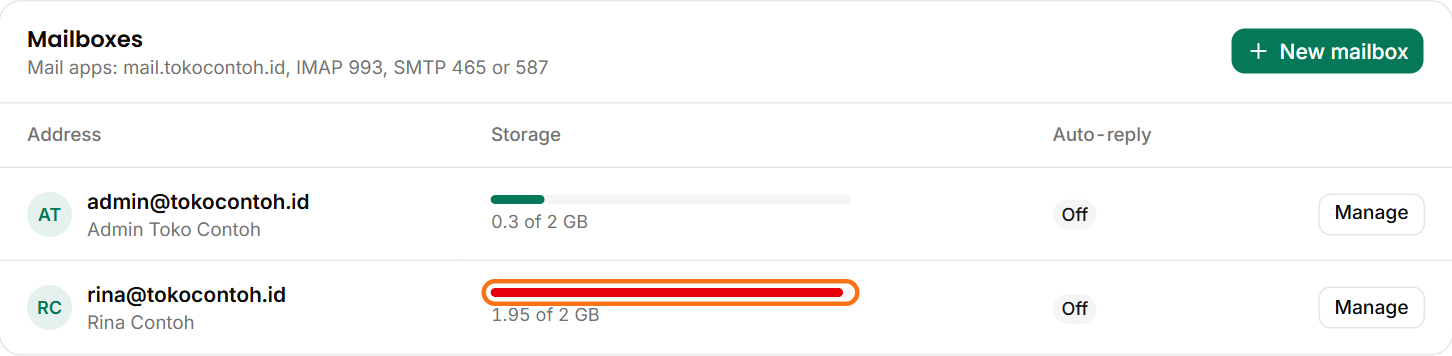
Open Email in the portal and choose your domain. The Storage column shows what each mailbox uses, for example 1.95 of 2 GB. Its bar turns red at 95%.
Freeing up space
- Open webmail (Open webmail) or your mail app.
- Delete old email, especially email with large attachments. Sort by size if your app can.
- Empty the Sent, Trash and Spam folders too: they count as well.
Email is read over IMAP, so deleting email on a phone or computer also deletes it from the server. Save any email you still need first.
A bigger quota
The owner or the Technical role can raise a mailbox's quota with Manage → Edit → Storage (GB), up to what your plan allows. Need more than that? Open a support ticket.
Was this article helpful?